Making Science

“The advance of technology is based on making it fit in so that you don’t really even notice it,so it’s part of everyday life.”
Bill Gates

There was a time when all biologists were also artists because they had to create drawings of their observations. Even after the invention of the camera, it was still easier to reproduce line art on a print press then photographs for quite some time.

Modern chemists purchase their glassware online or through a catalog. However, there was a time when a lot of chemists were also glass blowers. After all, if you can’t buy what you need, you must make it.  When I was an undergraduate, my university still had a full glass shop.

Early astronomers like Galileo designed and built their telescopes. Early biologists like van Leeuwenhoek, the discoverer of microorganisms, made their microscopes.  The development of optics for both telescopes and microscopes is a fascinating story in and of itself.

In a lot of ways, the progression of science is the progress of technology. The use of new technology in scientific research allows us to ask questions and collect data in ways that we previously could not, leading to advancements in our scientific understanding.

There are still fields like physics and astronomy were building instruments a standard part of the field. However, for many areas, the acquisition of new technology is most often made at conference booths or out of catalogs.

There is a problem with the model of companies providing all the scientific instrumentation. While standard equipment is readily available companies know about it and can make money, companies rarely invest in equipment with a tiny market.  It just happens the rare and nonexistent instrumentation is where innovation can move science forward: Unfortunately, only the scientists working at the cutting edge of their fields know about these needs.

Historically building new equipment has been a costly and challenging process. The equipment used to make a prototype has been expensive and took up a lot of space.Depending on the type of equipment created the electronics and programming might also be complicated.

However, over the last couple of decades, this has changed. There are now desktop versions of laser cutters, vinyl cutters, multi-axis CNC machines;I even recently saw an ad for a desktop water jet cutter. There is also the continuously improving world of 3-D printers. On the electronic side, there is both the Arduino and the Raspberry Pi platforms that allow rapid electronics prototyping using off-the-shelf equipment. Additionally, these tools allow the rapid creation of sophisticated equipment.

This list only represents some of the equipment currently available. The one thing that we can say for sure is that desktop manufacturing tools will become more cost-effective and more precise with future generations.

However, right now I could equip a digital fabrication(desktop style) shop with all the tools I talked about for less than the cost of a single high-end microscope. If access to desktop fabrication tools become standard how will it change science and science education?

There are currently organizations like Open-Labware.net and the PLoS Open Hardware Collection, making open-source lab equipment available. These organizations design and organize open-source science equipment. The idea is that open-source equipment can be cheaply built allowing access to science at lower costs. Joshua Pearce, the Richard Witte Endowed Professor of Materials Science and Engineering at Michigan Tech,has even written a book on the open-source laboratory, Open-Source Lab, 1st Edition, How to Build Your Own Hardware and Reduce Research Costs.

Imagine a lab that could produce equipment when it needs it.It would no longer be necessary to keep something because you might need it someday. Not only would we be reducing costs, but we would also free up limited space. As an example, a project I was involved with used multiple automated syringe pumps to dispense fluid through the internet each pump cost more than$1000.  A paper published in PLOS ONE describes the design and creation of an open-sourceweb controllable syringe pump that costs about $160.
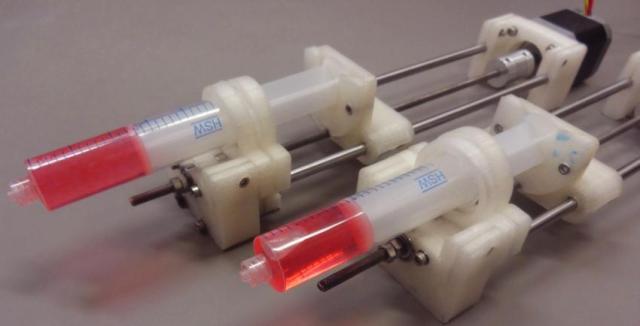
Researchers can now save thousands of dollars and slash the time it takes to complete experiments by printing parts for their own custom-designed syringe pumps. Members of Joshua Pearce's lab made this web-enabled double syringe pump for less than $160. Credit: Emily Hunt
Researchers can now save thousands of dollars and slash the time it takes to complete experiments by printing parts for their own custom-designed syringe pumps. Members of Joshua Pearce’s lab made this web-enabled double syringe pump for less than $160. Credit: Emily Hunt

Let’s take this a step further, why create standard equipment. As a graduate student, I did a lot of standard experiments especially in the areas of gel electrophoresis. However, a lot of the time I had to fit my experiments into the commercially available equipment. If I could’ve customized my equipment to meet my research, I could’ve been more efficient and faster. 

Beyond customization what about rare or unique equipment, the sort of thing that you can’t buy. Instead of trying to find a way to ask a question with equipment that is”financially” viable and therefore available design and builds tools to ask the questions the way you want.

What kind of educational changes would we need to realize this research utopia? Many of the skills are already taught and would only require changes in focus and depth.

In my physical chemistry lab course, we learn Basic programming so that we could model atmospheric chemistry. What if instead of Basic we learned to program C/C++ that Arduino uses. If we design additional labs across multiple courses that use programming to run models, simulations, and control sensors learning to program would be part of the primary curriculum.

In my introductory physics class,I learned basic electronics and circuit design. Introductory physics is a course that most if not all science students need to take.With a little bit of refinement, the electronics and circuit design could take care of the electronics for equipment design. The only real addition would be a computer-aided design (CAD) course so that students/researchers can learn to design parts for 3-D printers and multi-axis CNC’s. Alternatively, all the training to use and run desktop fabrication equipment could be taken care of with a couple of classes.

The design and availability of desktop fabricating equipment can change how we do science by allowing customization and creation of scientific instruments to fit the specific needs of the researcher. What do you think,should we embrace the desktop fabrication (Maker) movement as part of science?Should the creation of equipment stay a specialized field? Is it a good idea but perhaps you think there isn’t space in the curriculum to fit in training?

Thanks for Listening to My Musings

The Teaching Cyborg

We Need a Language to Talk About Ed Tech

“Communication is about what they hear, not what you say.”
Dave Fleet


As our understanding of learning and educational theory has grown how we teach and design educational tools have also developed.  Additionally, changes in society and our daily lives have affected how schools’ function.  We are currently in the middle of vast technological changes in society and our daily lives.  Technology has changed or is poised to change most of the aspects of our lives, communication, travel, entertainment, and shopping to name a few.

It is natural that these technological changes will affect education.  Some of the technologies will affect education because they improve the educational experience, other technologies will change education because they are the way we do things. Guessing how technology will influence education is as Arthur C. Clarke said, “Trying to predict the future is a discouraging, hazardous occupation.”

With my interest in educational technology, I am often involved in educational technology projects, especially concerning the STEM disciplines.  Quite frequently I read an article or hear a talk about a new piece of technology at a school, described many times, as cutting-edge technology.

I often find myself thinking about the term cutting-edge technology, what does it mean?  According to Techopedia cutting-edge technology means:

“Cutting-edge technology refers to technological devices, techniques or achievements that employ the most current and high-level IT developments; in other words, technology at the frontiers of knowledge. Leading and innovative IT industry organizations are often referred to as “cutting edge.””

One of the things I still constantly hear about is cutting-edge mobile phones and apps. I can hear some of you now “Still?” what do you mean by that?  What I mean is that smartphones are not cutting-edge technology. The first smartphone was IBM’s Simon in 1994; the phone came with many features (what we call apps today). Nokia and then Blackberry followed Simon. Finally, we got the iPhone and Android phones. If smartphones and apps have been in existence for about a quarter century are they cutting-edge?

Often, I think what people mean when they say cutting-edge is something new to their school or classroom. I wonder if I’m correct in this thought? If we are going to deal with educational reform and development it deserves clear and critical thinking; for that, we need to be clear in our language.

For a long time, we’ve known that clear communication in education is essential — the publication of a Taxonomy of Educational Objectives, Handbook I: Cognitive Domain in 1956 simplified communication in educational research. In time this book would come to be called Bloom’s Taxonomy. Over the last 62 years, this book has influenced education especially in the area of assessment.  What some people no longer remember was that Bloom’s Taxonomy was developed to help educators communicate with greater precision.

“You are reading about an attempt to build a taxonomy of educational objectives. It is intended to provide for the classification of the goals of our educational system. It is expected to be of general help to all teachers, administrators, professional specialists, and research workers who deal with curricular and evaluation problems. It is especially intended to help them discuss these problems with greater precision.” Bloom, B. H. (1956). Taxonomy of Educational Objectives, Handbook 1: Cognitive Domain. New York: David Mackay Co. pg. 1.

With the creation of a uniform taxonomy educational professionals could communicate clearly and precisely with each other.  Using the taxonomy, everyone knew what the word analysis meant.

Today we need a language to talk about technology in education.  A terminology about educational technology would not only assist in the clarity of communication, but with the types of technology, we use.

As an example, the emerging area of wearable technologies like the new generation of augmented reality (AR) glasses, Microsoft HoloLens, Garmin Varia Vision, or Google Glass Enterprise Edition is on the cutting-edge of technology.  The future of this technology along with Virtual Reality (VR) is so open as to be almost indescribable.  The biggest problem with AR and VR technology as well as most cutting-edge technology is the cost.

Should education invest large amounts of resources into cutting-edge technologies or should we wait until these technologies mature?  To discuss whether we should be working with technologies, we need to be able to agree on the type of technologies we are discussing.

In the case of education, we should not use terms like cutting edge, brand new, or emerging when we mean a technology that is new to teaching or worse new to just my school or program.  A new educational innovation could mean a technology that is in use in business or society but has little or no use in education.  A newly adopted technology could mean something that is used elsewhere in education but is new in a specific school or program.

Even if my suggested terminology is not the best (let’s be honest it’s doubtful it would be), I think we are in desperate need of an agreed upon language for the incorporation of technology in education.  As our world becomes more and more technological, we need to have the ability to discuss not only what technology to integrate into teaching but why we are incorporating it. What do you think, have you gotten confused when talking about technologies in education?  Do we need a language for technology? Would a language for educational technology lead to better and more critical discussion of educational technology?  So, when can we get A Taxonomy of educational terms: Technology.


Thanks for Listing to My Musings

The Teaching Cyborg

We Need CSS for e-books

“The layout of textbooks, I think, has been done with an assumption that students don’t read.”
James W. Loewen


Throughout several decades, I have watched the development of the technology used to build websites. I hand coded my first website using HTML 2 while I was still an undergraduate.

With each additional release of HTML, the addition of features allowed us to add more and more to websites. Additionally, many other technologies have added to websites like JavaScript and cascading style sheets (CSS).

I think CSS was one of the most significant changes to web design. One of the most apparent advantages of CSS is greater control of layout and design. While it would not be the best way to design a website with CSS, you can determine the position of every element on a webpage down to a single pixel.

Modern websites also use CSS to produce different layouts for desktop and mobile viewing. The reason I think CSS was such a significant change is CSS requires a different way of thinking about design and layout.

Proper use of CSS separates the content from the layout. CSS gives us the ability to move, position, and style content any way we want without changing the content. CSS layout is dependent on the use of tags, by giving each element of the website a unique identifier we can use CSS to place that element anywhere we want.

As an example, suppose we wrote three separate paragraphs and gave then CSS tags para1, para2, and para3.

One way to add the tag looks like this:

<p class=”para1”> Lorem ipsum dolor sit amet, consectetur adipiscing elit, sed do eiusmod tempor incididunt ut labore et dolore magna aliqua.</p>

Without the unique tag it would look like this:

<p> Lorem ipsum dolor sit amet, consectetur adipiscing elit, sed do eiusmod tempor incididunt ut labore et dolore magna aliqua.</p>

In and of itself that is not a big deal. However, since the paragraphs are now named elements, I can use CSS to style them independently of each other on the page.

If I do nothing, the three paragraphs will come one after the other. With just a little bit of CSS, I can make paragraph 2 right justified while the other two paragraphs stay left justified.

The code is:

.para2 {  text-align: right;  !important; }

The other paragraphs will stay left aligned because that is the default.

With some other code, I can make one of the paragraphs disappeared.

.para1 { display: none; }

This code would hide the first paragraph.

As the last example, I can change the order of the paragraphs.

p { display: flex; flex-direction: column;}

.para1 {order: 2 }

.para2 {order: 1 }

.para3 {order: 3}

This code would flip the order of the first and second paragraph while leaving the third where it is. These examples show that the code needed to make changes is rather small.

Now, why am I talking about CSS? Not long ago I wrote a blog discussing the problems I had with glossaries in several textbooks (read that blog here). In short, the traditional glossary at the end of a book was broken up and placed at the end of each chapter. For many reasons, I think this makes glossaries harder to use.

The reason for the glossary at the end of chapters is the fact that textbooks, especially open-source ones, are not meant to be used in their entirety but only the parts that fit your course. Since the book designers do not want extra words in the glossary, they split the glossary up.

Now imagine if we took the readability and accessibility of the electronic publication (EPUB) format and coupled that with the layout advantages of CSS. Now instead of copying, pasting, and editing the text of an open-source textbook with a few lines of code you can make a book for your course. Additionally, if something changes in your class, you can easily edit the book by making changes to the CSS. As an example, suppose we tagged all the text in a chapter with a unique name like chp#. If we added the same tag to the words in the glossary the words would behave the same as the chapter when formatted with CSS.

Now if we hide chp# not only will the chapter text disappear but so will the glossary words. However, you might ask “What if we wanted to move chp#? That will also move the glossary entries.” If the glossary entries moved, we would have the same problem with a glossary that I talked about before.

However, CSS has another little trick I skipped over; you can add tags together. As an example, your chapter text is a paragraph which has the default tag p. The glossary is a list, so each word is a list item which has the default tag li.

If I only wanted to move the chapter text, I would use the tag chp#.p this tag will leave the glossary words alone. To make a change to just the glossary words, I would use the tag chp#.li.

The makers of modern electronic books have done their best to re-create books just like their paper versions. While that is fine even desirable in some cases, we should not limit ourselves to it. After all, it should be comparatively easy to add functionality to electronic books.

We already have the code to make use of CSS it is in every web browser currently in use. This code can be added to e-reader software to give e-readers the ability to handle CSS. As for the creation of the books, we could start with any of the website creation tools and add the ability to export and save the documents (sites) as an EPUB document with CSS.

Having electronic books with expanded capabilities would give us tremendous advantages in addition to just CSS we can imagine being able to embed all kinds of additional content; media, live video, tests, and chat/discussions now books aren’t merely repositories for knowledge but a tool for learning.

We currently have all the tools we need to expand the functionality of the EPUBs format all we need to do is bring them together. Having this new EPUB format as a new tool would give us tremendous abilities as we design new and improved books for the use in the classroom.


Thanks for Listening to My Musings

The Teaching Cyborg

The Use of Technology Requires Flexibility

“Any sufficiently advanced technology is equivalent to magic.”
Arthur C. Clarke


At one time Best Buy was the largest reseller of CDs, this year Best Buy announced it was going to stop selling CDs.  I’m a little sad about that, I rather like CDs I own hundreds of them.  Don’t get me wrong I like the convenience of MP3’s, I still own an iPod and have a flash drive with over 3000 songs plugged into my car radio.  However, I still buy CD’s it looks like I am going to have given that up.

This decision from Best Buy got me thinking about audio technology in general.  Have you ever thought about how audio technology has changed in the last half-century?  Imagine telling someone they could have a device that let them listen to thousands of songs that was smaller than a deck of cards in 1968.  Think about all the different types of audio technology that was available over the last 50 or so years

  • Vinyl Albums – early 1900’s to the 1980s (peak usage)
  • 8 Track Tapes – 1964 to 1988
  • Cassette Tapes – 1962 to early 2000s (Still made on a minimal amount)
  • Compact Disks – 1982 to Present (phasing out)
  • MP3s – 1993 to Present
  • Streaming Services – 2005 to Present

Image showing vinyl records, 8-track Taps, cassette tapes, CDs, MP3s, and Streaming musics technologies. Image from PJ Bennett
Types of Audio Technologies

Over the last 50 years, several different types of audio technology have been developed and mostly discarded. Additionally, audio technology covers the development of technology in just one area. Add to that phones, movies, computers, cameras, and on and on and the development of technology has been astounding.

Something else I find interesting is the tendency to forget about technology as it develops.  I have had an interest in photography for most of my life. In that time, I have seen a lot of changes.  The most prominent being the conversion to digital over film.  Somewhere between 3 to 5 years after digital pictures became the predominant form of photography I started noticing ads for new photo editing tools.  When I first saw these tools my thought was “why would you want that?”  The purpose of these tools was to add grain to give your photos the traditional film look.

You might ask why does this surprise you? Well for many years (maybe even decades) each month I would receive photography magazines in the mail.  In each of these magazines, there was always a review of the newest film, one of the questions asked about each type of film was “how big you could enlarge a picture before the grain became evident?”  That is right for decades the goal of film development was to reduce and eliminate visible grain.  Now that digital cameras have finally given us that dream people want to put the grain back.  People have forgotten that in the days of film grain was the enemy.

In addition to all the new technologies, we live with the rate at which devices and technology get replaced by new ones has increased.  There is even a term for the rate of change Velocity of Obsolescence, the speed at which a newer/different technology replaces an older technology.  In a Forbs article from several years ago, one of the things they talked about was the time to obsolesce of web-enabled services, in 1998 the lifetime was 3-5 years while in 2013 the lifetime was 14-18 months.  New smartphones come out every 12 months.  With the subscriptions plans the update cycle on software has drastically changed.  As an example, Adobe software used to update every 18 months with a new version every three years.  Now they seem to add new features every couple of months. With this rate of change, there is no way to say what technology, our daily lives, and by extant society will look like in 20 or 30 years.

What does this increasing speed of technological development mean for schools? The most important thing is flexibility, schools need to develop a mindset that does not focus on specific technologies but the teaching and operational needs of the school.  Schools also need to realize we are entering a time where they can’t take years examining, testing, and adopting new technology and expect it to stay current.  While it is essential to think critically about educational technology we need to shorten the selection and implementation process so that we can get the most out of the life expectancy of the technology.

With the increasing impact of Bring Your Own Device (BYOD) schools are also going to need to develop technologies that are device agnostic.  As an example, many schools have adopted the use of clickers (student response systems). While the stand-alone devices work just fine to reduce the number of things students need to purchase schools have started using smartphone apps.  The cost savings side is always a good idea, the problem with apps is the upkeep.  As I said earlier new phones, come out every year, and operating systems upgrade multiple times a year, the maintenance could amount to 2 or more version of each app a year.

Why 2 or more versions a year? The mobile release cycle means you or the company you purchase your app from will need to have at least two apps one for iOS and one for Android.  In case you are one of the people that think you only need iOS the current US market share is 53.7% iOS and 45.96% Android (there are a few smaller ones).  With updates and end of support cycles on operating systems, you will need a new version of the app for each operating system at least once a year.

However, even if you go with mobile apps, this is still limiting.  All the apps give you is access to smartphones, you can probably get tablets out of the same app, but laptops and netbooks/Chromebooks are perhaps out of the question.

There is another option that schools could be using.  That option is web apps, which is an app that lives and runs on a web page.  The app is accessible through a web browser which means it is available through any web-enabled device.  The web app gives you access to phones, tablets, laptops, desktops (labs, distance education), netbooks/Chromebooks, and many emerging smart devices.  Also, since the app is a web page, you only need to maintain a single app, and operating system updates have little effect on the app.

Additionally, schools have turned to apps so that they could add functionality to the clickers.  Schools now want to add the ability to have students type out long answers, do complicated math, and so on.  The schools have forgotten that the use and reason for clickers were to collect quick short feedback. That feedback was then used to motivate peer to peer discussions or the direction of lectures.

With the current rapid speed of technological development, schools need to develop a streamlined method of assessing and choosing technology.  Schools also need to think about multiple platforms, so they don’t exclude students.  Because of the rate of development and the diversity of devices, it is entirely possible that schools will need to do more and more of their maintenance and development.  After all the rules and design considerations that were used to make that new killer app might not be usable in an app developed for education.


Thanks for Listening to My Musings

The Teaching Cyborg

Shh I’m hunting (for) Digital Natives

“Technology has become as ubiquitous as the air we breathe, so we are no longer conscious of its presence.”
Godfrey Reggio

Elmer Fudd holding finger to lips while hunting

Anyone that has worked in educational technology knows that there is often a lot of pushback when you try and introduce new technology to the classroom.  In some cases, pushback and questioning are good. It is always beneficial to think critically about all aspects of education after all the goal is to provide the best educational experience we can.

However, I have repeatedly encountered pushback from faculty that is not about whether a piece of technology is beneficial to teaching.  In these cases, the faculty says things like “I don’t want to use this (technology) because my students understand it better than I do.” This attitude comes directly out of the idea of the Digital Native.

Marc Prensky coined the term Digital Natives in Digital Natives, Digital Immigrants in 2001. Since then the idea of the Digital Native has been an almost a central theme in education spawning terms like Homo zappiëns and iGeneration and the notion that we need to redesign education because of the new abilities and skills these “new” humans have.

This belief in “new” humans has directly led to the fear that students know more about technology than their teachers.  I’m a biologist, and I have some questions about Digital Natives and their new skills and abilities.  Where did these new abilities come from are they magical?  I’ve even had people tell me it is the processes of evolution.

The idea of evolution and Digital Natives generates a teachable moment.  First, evolution is a slow process substantial changes are the result of many small changes over lots of generations.  Two, evolution is selective it is a process that plays on the parents.  For the appearance of Digital Natives to have been evolution, the parents would have to be Digital Natives, and being a Digital Natives would have had to confer an advantage in reproduction. There are several other points I can make, but I think it is safe to say that these new skills are not the product of evolution.

There is another possibility for the creation of Digital Natives the development of the brain.  A lot of neural development occurs in young children and according to some physiological studies continues at a high degree until around 25.  So maybe exposure to lots of technology from a young age leads to a difference in how the brain learns to work.  Fortunately for us, researchers have started looking at Digital Natives and their skills.

The research into Digital Natives is uncovering the same thing that I have experienced in my work.  The research results and my experience show that as far as having lots of computer/technologies skills and the ability to multi-task Digital Natives don’t exist.  One of my favorite comments about digital natives comes from a review paper The myths of the digital natives and the multitasker by Paul Kirschner and Pedro De Bruyckere “Many teachers, educational administrators, and politicians/policymakers believe in the existence of yeti-like creatures populating present-day schools namely digital natives and human multitaskers.”

A yeti holding a smartphone

In addition to a catchy phrase, the editorials section of Nature references it as “The digital native is a myth, it claims: a yeti with a smartphone,” Kirschner and Bruyckere make some crucial points.  First, when Prensky first coined the term Digital Natives, this was not based on any controlled research merely an observation about children born after the widespread adoption of mobile devices and how they interacted with them.  Because of these observations, he proposed several skills and abilities that these individuals would have as they grew up.

We are now collecting information about the Digital Natives, and the research is showing that while these students use a lot of mobile technology for communication and socializing, they don’t have a deep understanding of the technology.  I have often served as escalated tech support (especially for things I have built or helped to develop), many of the students I have worked with are from the generation of Digital Natives. Since so many people talked about the Digital Natives I think to some degree I even believed in the Digital Native.

When helping students, I quickly discovered that many of these students could not do any form of troubleshooting on their own.  If the button didn’t seem to do what they wanted, the students didn’t know what to do next. In one of the programs which involved fully online students, I would always start my troubleshooting with the question “What operating system are you using?”  Some of the answers I got were “I don’t know the computer says Toshiba.”, “I think I’m using Firefox.”, “how would I tell?” and these were not one-offs I got these answers a lot.

Beyond in-depth technical knowledge, Kirschner and Bruyckere also discuss the student’s ability to utilize the internet.  Looking at the papers Information behavior of the researcher of the future: Work Package II and The Google generation: The information behavior of the researcher of the future the researchers conclude that students of the Digital Native generation have pore information retrieval skills.  Specifically, the students have limited ability to deeply dive into information and often fail in critical thinking and evaluation of the information they do retrieve.

One of the most significant points of the internet and Web 2.0 and beyond was that we had reached a point where we were not just consumers of information but creators as well.  While there still needs to be more research, it also appears that Digital Natives are mostly passive consumers of information and not the general creators we assumed they would be.

All this information suggests that the idea that we should be scared to incorporate technology into our classrooms because the students know tech better than we do is a fallacy.  Closely related to this, the idea that we need to redefine and redesign the classroom because it is no longer suited to the skills and abilities of our students is also a fallacy.

As I have said, technology can be a huge benefit to the classroom.  Technology can be a massive equalizer in education.  However, we need to incorporate technology into the classroom based on educational pedagogy and as the solution to actual, not yeti-like, problems.  I do think we need to make some changes to education based on our modern technological world.  We should be teaching our students how to determine the value and validity of information sources on the internet.  If they are going to live in a technological world, we should teach them problem-solving skills, so they know what to do when the button does not do what they want.  We should be teaching communication skills, so they can make sure their thoughts and ideas get communicated.  Specifically, we should use good educational practices when we design our courses and programs, not yeti footprints.


Thanks for Listing to my Musings

The teaching Cyborg